How LG’s Monitor Software Became an Ad Platform
By OFOKI TECH | July 24, 2026
LG has agreed to remove a McAfee pop-up advertisement from its monitor software after direct intervention from Microsoft. The issue, which came to light over the past three weeks, highlights how Windows’ hardware-automation policies have been used to deliver third-party software to users without explicit consent.
How a Monitor Became an Ad Platform
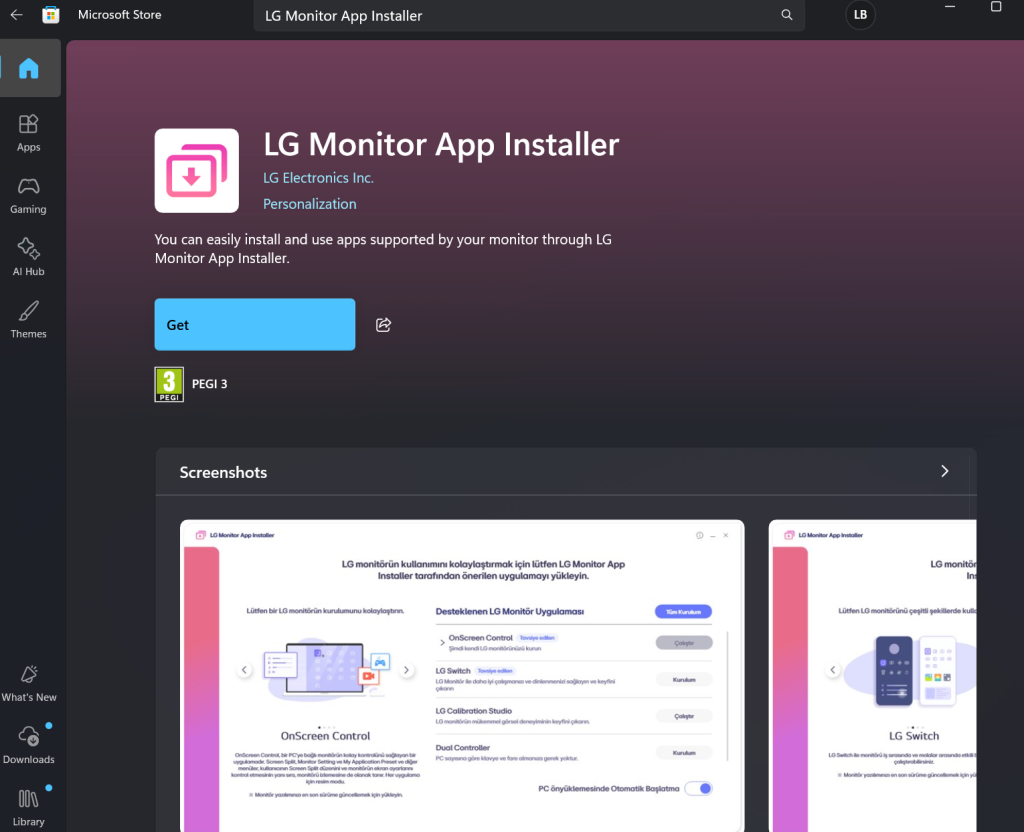
At the center of the controversy is the LG Monitor App Installer, a Windows application that has been automatically installing itself on PCs connected to LG displays. Users do not install the app themselves. Instead, it is deployed silently through Windows Update and the Microsoft Store based on the monitor’s hardware metadata.
Microsoft allows hardware manufacturers to register a Hardware Support App (HSA) in the Microsoft Store. When Windows detects a compatible device, the Store can automatically install the associated software without displaying a notification or requesting permission. Microsoft’s own documentation for developers warns that this behavior can be « confusing and frustrating » for users, yet the policy remains active.
The LG Monitor App Installer itself offers little functionality beyond acting as a portal. It points users to other LG applications and displays a pop-up advertisement for McAfee antivirus software — even on systems where McAfee is not installed and has never been requested.
Testing by Gamers Nexus confirmed the behavior was not isolated. In their evaluation, the McAfee pop-up appeared on 31 out of 32 system bootups after connecting an LG UltraGear monitor to a Windows 11 PC. User reports on Reddit date the auto-installation behavior as far back as 2024, but the recent escalation in ad frequency drew widespread attention in July 2026.
The app also requests broad system permissions. According to its Microsoft Store listing, it requires access to « all system resources » and the user’s internet connection. LG’s linked privacy policy mentions automatic collection of device data, internet activity, and geolocation information — all gathered by software the user never explicitly agreed to install.
Microsoft’s Intervention
Microsoft’s involvement began when Pavan Davuluri, a Microsoft executive overseeing Windows and Surface, publicly confirmed that Microsoft had contacted LG about the issue. Following that outreach, LG agreed to disable the McAfee pop-up within its Monitor App Installer.
Microsoft has not announced any broader policy changes to the Hardware Support App framework. The intervention appears to have been targeted and reactive, driven by the volume of user complaints and media coverage rather than a systemic review of how OEMs use silent installation privileges.
For LG, the concession is partial. The company is removing the McAfee advertisement, but there is no confirmation that the Monitor App Installer itself will stop auto-installing or that LG will reduce the data-collection scope outlined in its privacy policy.
Data Collection
The permissions requested by the LG Monitor App Installer go beyond what is necessary for monitor management. The Microsoft Store page lists the following requirements:
- Use of all system resources
- Access to the internet connection
- Background operation without user initiation
LG’s privacy policy, linked within the app listing, discloses the collection of:
- Device identifiers and hardware metadata
- Internet activity and browsing behavior
- Geolocation information
Whether this data collection is tied to the McAfee promotion or represents a broader analytics strategy is unclear. LG has not issued a detailed statement addressing the privacy implications, and Microsoft has not indicated whether it plans to audit data practices across other Hardware Support Apps.
How Users Can Block It
Users who want to prevent similar auto-installations have limited options, and those options vary by Windows edition.
On Windows 11 Pro, the installation can be blocked through a Group Policy setting that prevents automatic downloads of manufacturer apps and custom icons. Multiple Reddit users have confirmed this method works for the LG Monitor App Installer specifically.
On Windows 11 Home, the path is less direct. Users can navigate to Advanced system settings and disable the option to « automatically download manufacturers’ apps and custom icons. » However, this is a system-wide toggle that affects all hardware companion apps, not just LG’s.
Removing the app after installation is straightforward — it can be uninstalled through the standard Windows Apps menu — but Windows may reinstall it automatically if the monitor remains connected and the underlying policy is not changed.
The Bigger Picture: This Is Not Just LG
LG is not the only manufacturer using silent installation pathways. Dell’s Alienware Command Center auto-installs when an Alienware monitor is connected to a Windows PC. Samsung has also been reported to deploy monitor companion software through the same Hardware Support App mechanism.
The difference in LG’s case was the inclusion of a third-party advertisement. While Dell and Samsung have been criticized for bloatware, the McAfee pop-up represented a step further: a paid promotion injected into the user experience by hardware the customer already purchased.
The episode suggests Microsoft currently allows silent installations but drew the line at third-party advertising delivered through them. For hardware vendors, the case demonstrates that third-party advertising inside Hardware Support Apps is likely to attract Microsoft’s attention.
What LG Has Not Addressed
Several questions remain unanswered.
LG has not explained why the McAfee ad was included in the first place, whether it was part of a revenue-sharing agreement, or how long the arrangement had been active. The company has also not clarified whether the Monitor App Installer will continue to auto-install on new systems or whether users will be given an opt-in prompt going forward.
Microsoft, for its part, has not committed to policy changes that would prevent similar situations with other manufacturers. The Hardware Support App framework remains active, and the Windows Store still allows silent installations based on device metadata.
Bottom Line
LG’s removal of the McAfee pop-up is a win for user advocacy, but it is a reactive fix to a systemic issue. The underlying mechanism — silent installation of OEM software through Windows Update — remains intact. Microsoft intervened after the issue drew significant public attention, though it has not announced broader policy changes.
For users, the takeaway is cautionary. Connecting a new monitor to a Windows PC can trigger automatic software installations that include ads, data collection, and broad system permissions. The tools to block them exist, but they are buried in system settings that most users never access.
Whether Microsoft will tighten its Hardware Support App policies before another manufacturer tests the same boundaries is the question that matters. For now, the answer appears to be no.
Sources and further reading
- Ars Technica — Microsoft responds to LG monitors installing McAfee ads on Windows
- The Verge — LG monitors connecting to Windows Update to install app showing McAfee pop-ups
- PCMag — LG to remove unwanted monitor pop-ups following Microsoft intervention
- Tom’s Hardware — Automatic Windows installers displaying ads through Microsoft Store
- Windows Latest
- Reddit discussion (r/pcmasterrace)
- Gamers Nexus testing