
Windows 11 24H2 Dies in 78 Days: Microsoft Forces the Upgrade to 25H2
By OFOKI TECH | July 27, 2026
Microsoft has set a hard deadline. Windows 11, version 24H2 Home and Pro editions will reach end of support on October 13, 2026. After that date, devices running these editions will stop receiving monthly security updates, non-security preview updates, time zone updates, and technical support. The announcement is not a rumor. It is published on Microsoft’s official release health dashboard and repeated across every cumulative update release note for the version.
The timeline is tight. As of late July 2026, users have less than three months to act. Microsoft is not waiting. The company has already begun force-upgrading eligible Windows 11 Home and Pro devices to version 25H2, and the rollout is now mandatory for PCs not managed by IT departments.

What End of Support Actually Means
When Microsoft declares end of updates for a Windows version, the implications are concrete. Devices running Windows 11 24H2 Home or Pro after October 13, 2026, will no longer receive patches for known issues, protections against the latest security threats, or even adjustments for daylight saving time changes. According to Microsoft’s official documentation, the operating system will continue to function, but it will become increasingly vulnerable as new exploits are discovered and left unpatched.
The risk is not theoretical. Unsupported versions of Windows have historically become prime targets for malware and ransomware campaigns once the security patch pipeline shuts down. For home users, the exposure is direct. For small businesses running Pro editions without an IT department, the exposure is worse, because the forced upgrade mechanism applies to them too.
Enterprise and Education Editions Get a Reprieve
Not every edition of 24H2 is dying in October. Microsoft’s lifecycle data confirms that Windows 11 24H2 Enterprise, Education, IoT Enterprise, and Enterprise multi-session editions remain supported until October 12, 2027. That is a full additional year of updates.

The distinction matters for organizations. IT-managed devices are excluded from the forced consumer rollout, allowing administrators to plan their own migration schedules. But for the vast majority of individual users and small offices running Home or Pro, the clock is the same: October 13, 2026, is the final day.
Microsoft Is Already Forcing 25H2
Microsoft has moved beyond optional upgrades. In June 2026, the company began mandatorily pushing Windows 11 25H2 to all eligible Home and Pro PCs not managed by IT departments. The rollout uses a machine learning-based intelligent system to target devices least likely to encounter compatibility issues. PCs that could face trouble are placed on a waitlist until blockers are resolved.
ZDNET confirms that users can postpone the update temporarily through Windows Update settings, but they cannot stop it indefinitely. The pause options are limited to one, two, or three weeks. Eventually, the update installs automatically.
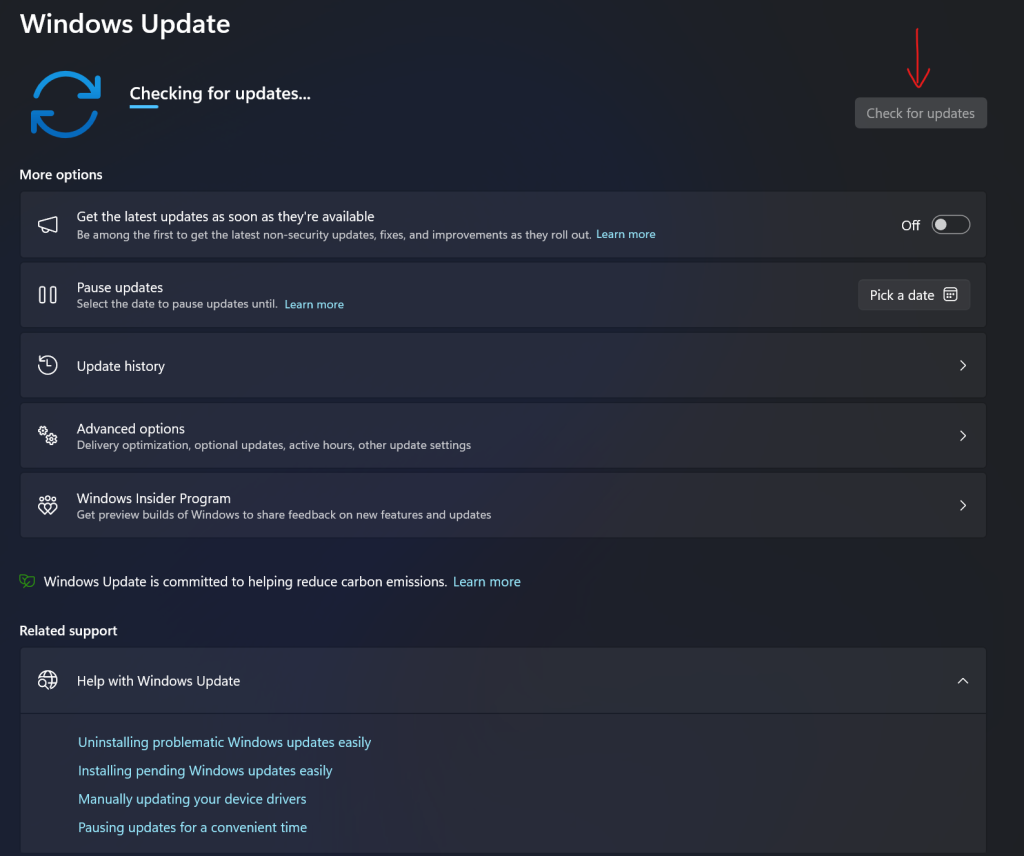
The upgrade itself is relatively lightweight. Because Windows 11 25H2 shares the same codebase as 24H2, the installation typically requires only a small enablement package download, a few minutes of processing, and a single restart. Users who manually check for updates via Settings > Windows Update > Check for updates can trigger it immediately if their device is flagged as ready.
What 25H2 Changes and What It Does Not
Windows 11 25H2 is not a visual overhaul. It is an evolutionary update that extends the support lifecycle by 12 months and lays groundwork for the upcoming 26H2 release. Microsoft’s release information page lists 25H2 as OS build 26200, with support running until October 12, 2027, for Home and Pro editions.
The update includes the standard cumulative security fixes, performance tweaks, and minor feature adjustments. It does not fundamentally alter the Windows 11 interface. For users satisfied with 24H2, the transition should be seamless. The primary benefit is continued access to the security patch pipeline.
What Microsoft Has Not Clarified
Despite the clarity of the deadline, several questions remain. Microsoft has not published a comprehensive list of devices that will be blocked from the 25H2 upgrade due to hardware incompatibility. While the company uses machine learning to filter problematic systems, users with older or uncommon configurations may discover their PC is ineligible only when the update fails to appear.
Additionally, Microsoft has not detailed what happens to Windows 11 24H2 devices that cannot upgrade to 25H2 after October 13. In previous cycles, unsupported PCs simply stopped receiving updates. The company offers no extended support program for consumer editions of Windows 11 comparable to the ESU (Extended Security Updates) program available for Windows 10.
How to Check Your Version and Upgrade
Users unsure of their current Windows version can verify it quickly. Open Settings > System > About, and look for the edition and version number under Windows specifications. If the version reads 24H2, the device is affected.
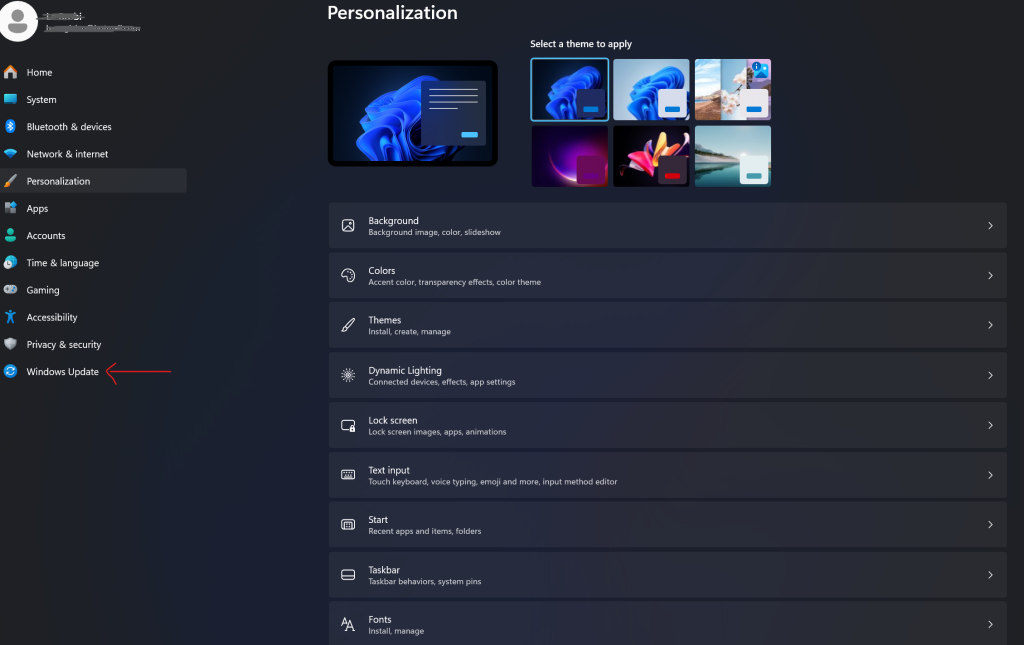
To trigger the upgrade manually, navigate to Settings > Windows Update and select Check for updates. If the PC is eligible and flagged by Microsoft’s rollout system, the option to download and install Windows 11 25H2 will appear. The process requires a restart and, on most systems, completes in under 15 minutes.
For users who prefer to wait, the automatic rollout will reach the device eventually. The only action required is to allow the restart when prompted. Postponing is possible, but the update cannot be declined permanently.
Bottom Line
Windows 11 24H2 Home and Pro have 78 days of official life remaining. Microsoft is treating this deadline seriously, using forced upgrades to push users onto 25H2 before support expires. The upgrade is minor, the process is automatic, and the alternative — running an unpatched operating system — is not viable for anyone connected to the internet.
For Enterprise and Education users, the pressure is lower. The 24H2 lifecycle extends to October 2027, giving IT departments a full year to plan. But for everyone else, the message from Microsoft is clear: upgrade now, or lose security updates forever.
Sources and further reading
- Microsoft Learn — Windows 11, version 24H2 known issues and notifications
- Microsoft Learn — Windows 11 release information
- Microsoft Learn — Windows 11 Home and Pro lifecycle
- Microsoft Learn — Windows 11 Enterprise and Education lifecycle
- Microsoft Support — July 14, 2026 KB5101650 update notes
- PCWorld — Microsoft is now force-upgrading all Windows 11 Home PCs to 25H2
- ZDNET — Why Microsoft is forcing Windows 11 25H2 update on all eligible PCs
- BleepingComputer — Windows 11 24H2 Home and Pro reach end of support in 90 days